Closed-Loop Options Trading: Tuning AI Analysis via Historical Success Feedbacks
How we built a real-time feedback loop connecting the Trade Edge Analyzer to the Portfolio Analysis Analysis Engine—automatically prioritizing strategies you win on and hiding leaks.
Closed-Loop Options Trading: Tuning AI Analysis via Historical Success Feedbacks
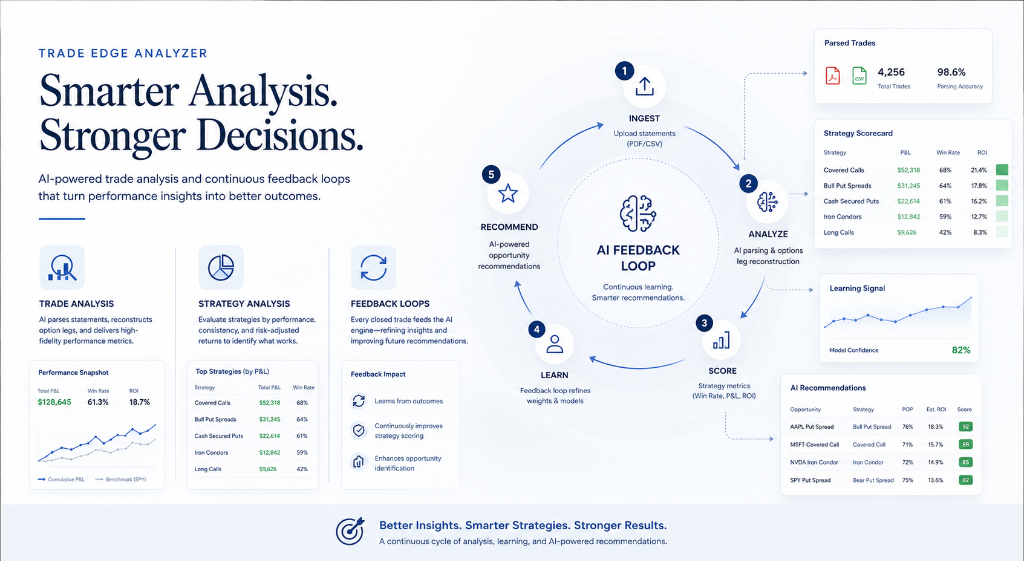
In traditional retail option platforms, analysis and execution are completely disconnected. You run some trade history reports, see that you are struggling with a specific strategy (like buying long calls), and yet your analysis scanner keeps showing you long call setups.
Today, we are changing that by introducing Closed-Loop Options Trading—a direct connection between your historical trading outcomes (Trade Edge Analyzer) and our real-time options scanner (Portfolio Analysis Analysis).
By leveraging your past wins and losses as a direct feedback loop, we automatically align the AI analysis engine with your historical strengths. Here's a deep dive into the engineering behind this feedback architecture.
1. The Core Infrastructure: High-Fidelity Trade Analysis
Before a feedback loop can work, it needs clean, structured data. Options statements are notoriously difficult to parse because brokers do not export "trades"; they export individual transaction "legs."
The Trade History Analyzer solves this by reconstructing your historical trade book:
- Multimodal Document Parsing: Powered by Gemini, the app extracts raw transaction data directly from uploaded brokerage PDFs or CSV statements, cleaning up sweep cash accounts and parsing strikes, expiries, premiums, and execution dates.
- Strategy Pairing Engine: Reconstructs separate leg rows back into their original multi-leg strategies (e.g. grouping separate long/short puts into a single Bull Put Spread transaction).
- Exact ROI and Margin Calculations: Automatically calculates capital at risk using strategy-specific margin requirements (e.g. width of the spread minus credit collected) to output true strategy-level Return on Investment (ROI).
- Date Sanitization & Expiry Fallbacks: Corrects dates so that future-dated option expirations (like 2027/2028 LEAPS) are never copied as entry or exit dates, maintaining accurate Average Days Held metrics.
2. Technical Architecture: Leveraging Trading Weights
Once your statement is analyzed, the scorecard calculates your performance metrics per strategy. If the AI Success Feedback Loop is enabled, the backend maps these results to analysis multipliers:
Raw Statements Upload (PDF/CSV)
Upload brokerage statements in PDF or CSV format from multiple brokers.
Multimodal AI Parsing (Gemini)
Multimodal AI (Gemini) reads and extracts all transaction data, including option legs, prices, dates, and metadata.
Options Leg Reconstructor & Pairing Engine
Cleans, normalizes, and pairs legs into complete options strategies (spreads, condors, collars, etc.).
Strategy Scorecard Metrics (Win Rate, P&L, ROI)
Calculates key performance metrics by strategy, symbol, and time period.
AI Success Feedback Loop Engine
Captures outcomes from closed trades to refine strategy scoring and continuously improve future opportunity identification.
User Profile Preferences (DB JSON)
Retrieve user preferences (risk tolerance, strategy focus, etc.) to tailor suggestions.
Market Option Chains
Fetch real-time option chains, IV, Greeks, and live market data.
Opportunity Scanner Engine
Combines user bias, historical success, and live market option chains to scan and rank potential trade opportunities.
Tuned AI Recommendations (Portfolio Analysis)
Deliver personalized, high-probability, high-return option recommendations with full rationale and analysis.
The Weight Formula
We calculate a performance bias multiplier for each scanner-compatible strategy:
- Win Rate >= 60% and Positive Net P&L: Multiplier is set to 1.30x (Boost). This pushes matching scanner opportunities (e.g. Bull Put Spreads) to the top of your analysis feed.
- Win Rate < 45% or Negative Net P&L: Multiplier is set to 0.70x (De-prioritize). This pushes those setups to the bottom of the list.
- Otherwise: Multiplier remains 1.00x (Neutral).
When the Opportunity Scanner evaluates market option chains (calculating Score = Probability of Profit * Annualized ROI), it applies these custom multipliers directly to the score.
3. User Controls and Preferences Tuning
We believe in transparency and control. You can manage the feedback loop at any time:
- One-Click Sync: Right after uploading a statement, if the feedback loop is off, the analyzer displays a card allowing you to optimize your analysis bias with a single click.
- Tuning Center: Under the Preferences tab, we've added a dedicated AI Success Feedback Loop control center. Toggling it on shows your current strategy weights (win rates, historical P&L) mapped dynamically from your database profile, allowing you to easily manage your AI scanner alignment.
By combining historical performance data with live market scans, we help you focus on the strategies where you already have a proven statistical edge. Try it out today on your dashboard!
Ready to put this into practice?
Join OptionsMastery.ai today and let Athena instantly find the optimal strategies for your portfolio.
Start Free Trial